

Description
Lightweight Ad Blocker with Privacy Protection
Overview
The software is a browser extension designed to block advertisements, trackers, and malicious domains across web platforms. Built as a fork of uBlock Origin, it inherits a strong foundation in efficiency and performance while introducing subtle enhancements tailored to benefit both users and content publishers. Its primary purpose is to deliver a faster, cleaner browsing experience by minimizing intrusive content without significantly impacting system resources. This tool is ideal for privacy-conscious individuals, frequent internet users, and professionals who rely on uninterrupted access to online content. It addresses common issues such as slow page loading, data overuse from ads, and exposure to potentially harmful websites. Real-world usage scenarios include daily web browsing, research, content consumption, and online work environments where efficiency and security are critical. The developer acknowledges its roots in uBlock Origin and maintains a commitment to preserving its lightweight design while exploring new ways to balance user experience with publisher sustainability. No additional developer background is provided beyond this acknowledgment.
Key Features & Capabilities
- Efficient Content Blocking – Utilizes a low-memory and low-CPU footprint to enforce thousands of filters, ensuring fast page loads and minimal system impact.
- Comprehensive Filter Lists – Comes preloaded with widely recognized filter lists including EasyList, Peter Lowe’s Ad server list, EasyPrivacy, and Malware domains.
- Flexible Filter Management – Supports reading and creating filters from hosts files, allowing advanced users to customize blocking behavior.
- Extensible List Library – Offers access to additional filter lists such as Fanboy’s Enhanced Tracking List, Dan Pollock’s hosts file, hpHosts, MVPS HOSTS, and Spam404.
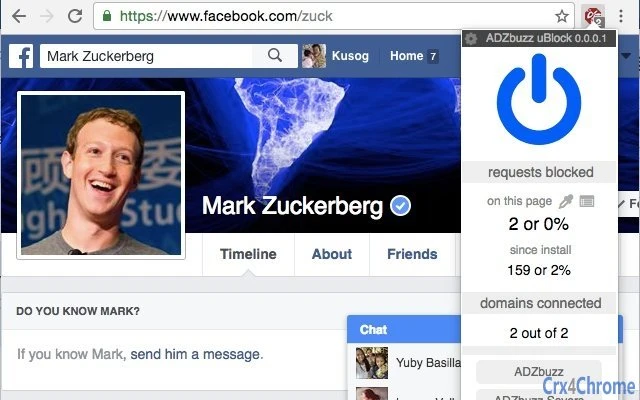
- Site-Specific Control – Includes a power button in the popup to temporarily disable or enable blocking for individual websites, offering granular control.
These features support practical use cases like blocking intrusive ads during online research, preventing tracking scripts from collecting browsing data, and protecting against known malware domains. The ability to manage filters from hosts files makes it suitable for users who want deeper control over their browsing environment. Site-specific toggling ensures that users can bypass blocking when visiting sites that rely on ads for revenue, promoting a balanced digital ecosystem.
User Interface, Workflow & Performance
The user interface is minimalistic and focused on functionality, featuring a compact popup with essential controls. Navigation is straightforward, allowing users to quickly access filtering options and toggle blocking for the current site. The workflow is optimized for speed and ease of use, with minimal clicks required to manage settings. The extension integrates seamlessly into supported browsers, maintaining a low profile during normal browsing. Performance is designed to be efficient, with the developer emphasizing a lightweight footprint. However, exact performance details such as CPU or RAM usage were not specified. Stability is expected to be high, given its foundation in a well-established project. The extension does not appear to consume significant system resources under normal operation, though actual behavior may vary based on the number of active filter lists and website complexity.
Compatibility & System Requirements
The software is compatible with Windows, Mac, and Linux operating systems. It supports major browsers including Chrome, Firefox, Edge, and Brave. The extension version is 1.6.1, with a file size of 3.2 MB. Installation is straightforward and does not require advanced technical knowledge. Exact system requirements were not listed, but the lightweight nature of the software suggests it will run efficiently on most modern devices. Platform compatibility information is limited to the operating systems and browsers explicitly mentioned.
Pros and Cons
Pros
- Lightweight design with minimal impact on system resources
- Fast performance and efficient filtering engine
- Supports a wide range of filter lists for customizable protection
- Flexible management of filters and hosts files
- Free to use with no hidden costs
Cons
- Advanced features may require technical knowledge to configure
- Enabling additional filter lists could increase the risk of website breakage
- Compatibility with niche or less common browsers is not confirmed
FAQ Section
Is ADZbuzz uBlock compatible with my browser?
The extension is designed to work with major browsers including Chrome, Firefox, Edge, and Brave. Compatibility with other browsers is not confirmed.
Is this software safe to use?
Yes, the extension is built on a trusted foundation and does not collect personal data. It operates locally within the browser environment.
How often are updates released?
Updates are released periodically to maintain compatibility and improve functionality. The latest version is 1.6.1, released on July 15, 2024.
Does this require an internet connection to function?
Yes, the extension requires an internet connection to download and apply filter lists, but it operates locally once loaded.
Can I use this offline?
Basic functionality may work offline, but updating filter lists and applying new rules requires an active internet connection.
Final Thoughts
ADZbuzz uBlock delivers a powerful, lightweight solution for users seeking enhanced privacy and faster browsing. Its foundation in uBlock Origin ensures reliability and efficiency, while its unique focus on a balanced user-publisher relationship adds a thoughtful layer to its design. The tool excels in performance, ease of use, and flexibility, making it a top choice for both casual users and professionals. While some advanced features may require familiarity with filter lists and hosts files, the core experience remains accessible. For anyone looking to block ads and trackers without slowing down their system, this extension is a strong recommendation. Download ADZbuzz uBlock now.
Guides & Tutorials for ADZbuzz uBlock Extension for Chrome
How to install ADZbuzz uBlock Extension for Chrome
- Click the Preview / Download button above.
- Once redirected, accept the terms and click Install.
- Wait for the ADZbuzz uBlock Extension for Chrome download to finish on your device.
How to use ADZbuzz uBlock Extension for Chrome
This software is primarily used for its core features described above. Open the app after installation to explore its capabilities.
User Reviews for ADZbuzz uBlock Extension for Chrome 0
No reviews found





